1. Introduction
In this post, let's look at one-to-one (1:1) mapping.
2. Development Environment
The code written in this post is available on GitHub.
- OS : Mac OS
- IDE: Intellij
- Java : JDK 1.8
- Source code :
- Foreign key on the owning table
- Foreign key on the target table
- Software management tool : Maven
3. One-to-One (1:1) Association
In a one-to-one relationship, the reverse direction is also a one-to-one relationship. In a many-to-one relationship the many (N) side always holds the foreign key, but in a one-to-one relationship you can place the foreign key on either the owning table or the target table, so during development you have to choose which side to put it on.
3.1 When the Foreign Key Is on the Owning Table
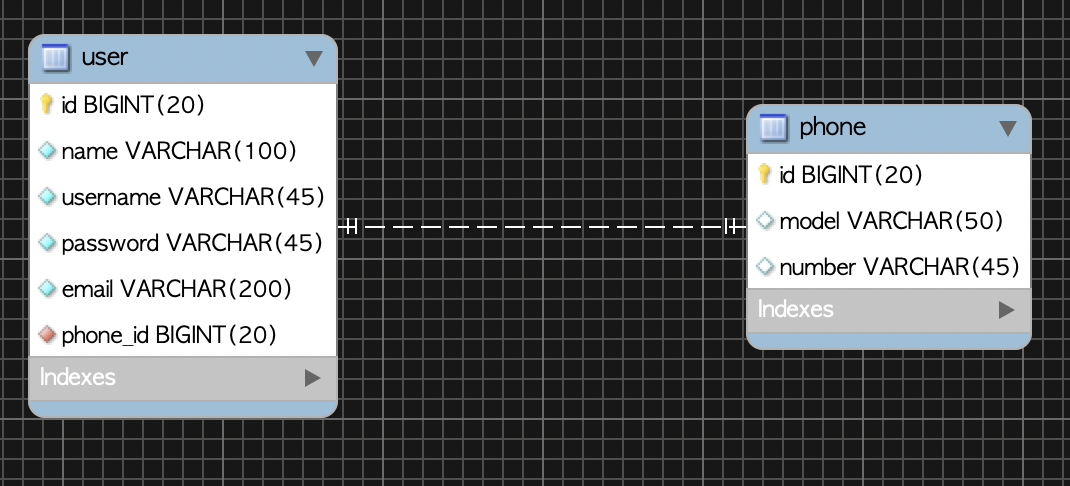
When the foreign key is on the owning table, you map it with a structure where the owning object also holds an object reference.
- Owning table :
User- When it has the foreign key (phone_id)
- Target table :
CelluarPhone
3.1.1 One-to-One Unidirectional
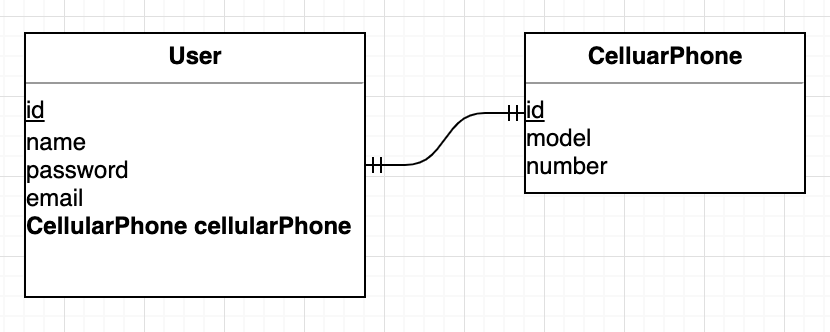
Let's configure it as one-to-one unidirectional. After declaring @OneToOne on the User entity (the owning object), declare the CellularPhone object, which is the target table. It is a structure where you can query the user's phone information through the User object.
@Table(name = "user")
public class User extends DateAudit {
    @Id
    @GeneratedValue(strategy = GenerationType.IDENTITY)
    @Column(name = "user_id", unique = true, nullable = false)
    private Long id;

    private String username;
    ...(omitted)...

    @OneToOne
    @JoinColumn(name = "id")
    private CellularPhone cellularPhone;
		...(omitted)...
}
@Table(name = "cellular_phone")
public class CellularPhone extends DateAudit {
    @Id
    @GeneratedValue(strategy = GenerationType.IDENTITY)
    @Column(name = "phone_id")
    private Long id;

    private String phoneNumber;

    private String model;
		...(omitted)...
}
Let's save and query the User and CellularPhone objects.
@Test
public void save_user_phone() {
  CellularPhone cellularPhone = CellularPhone.builder()
    .model("android")
    .phoneNumber("010-2342-5234")
    .build();
  phoneRepository.save(cellularPhone);

  User user = User.builder()
    .name("Frank")
    .email("sdf@sdf.com")
    .username("id1234")
    .password("1234")
    .build();

  user.setCellularPhone(cellularPhone); //Establishes the association

  userRepository.save(user);

  List<User> users = userRepository.findAll();
  assertThat(users.get(0).getName()).isEqualTo("Frank");
  assertThat(users.get(0).getCellularPhone().getPhoneNumber()).isEqualTo("010-2342-5234");
}
3.1.2 One-to-One Bidirectional
Now let's configure it bidirectionally. We make the CellularPhone object also hold a User object.
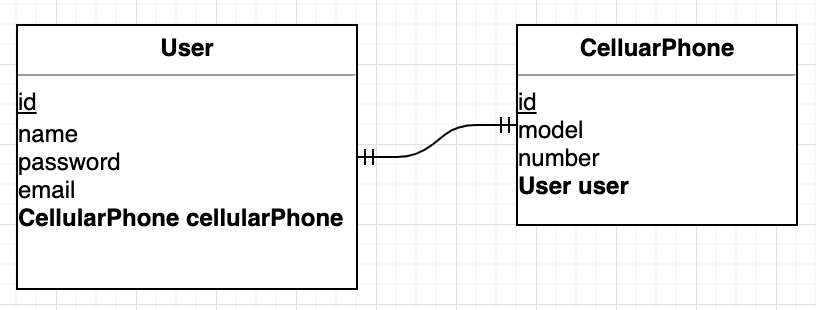
We declare an additional @OneToOne annotation on the CellularPhone entity. And since it is bidirectional, we specify the owner of the association with the mappedBy attribute. Since the user table holds the foreign key, we set User's cellularPhone as the owner of the association.
@Table(name = "cellular_phone")
public class CellularPhone extends DateAudit {
    @Id
    @GeneratedValue(strategy = GenerationType.IDENTITY)
    @Column(name = "phone_id")
    private Long id;
  	...(omitted)...

    @OneToOne(mappedBy = "cellularPhone")
    private User user;
}
Let's save the entities and query them in a Unit Test.
@Test
public void save_user_phone() {
  CellularPhone cellularPhone = CellularPhone.builder()
    .model("android")
    .phoneNumber("010-2342-5234")
    .build();

  User user = User.builder()
    .name("Frank")
    .email("sdf@sdf.com")
    .username("id1234")
    .password("1234")
    .build();
  user.setCellularPhone(cellularPhone);

  cellularPhone.setUser(user); //Sets the User object from CellularPhone
  userRepository.save(user);
  phoneRepository.save(cellularPhone);

  List<User> users = userRepository.findAll();
  assertThat(users.get(0).getName()).isEqualTo("Frank");
  assertThat(users.get(0).getCellularPhone().getPhoneNumber()).isEqualTo("010-2342-5234");

  assertThat(cellularPhone.getUser().getName()).isEqualTo("Frank"); //Checks the User information from the CellularPhone object
}
Caveat
In a one-to-one relationship, even if you configure lazy loading, there are cases where eager loading occurs. For example,
User.cellularPhone: lazy loading worksCellularPhone.user: lazy loading does not work > - Due to a limitation of proxies, in a one-to-one relationship where the foreign key is not directly managed, eager loading occurs even if you configure lazy loadingFor reference, the default fetch type of the @OneToOne annotation is eager loading (EAGER).
@Test
public void 일대일관계에서_지연로딩_테스트() {
saveUserWithPhones(1, 1);

List<User> users = userRepository.findAll();
assertThat(users.get(0).getCellularPhone().getModel()).startsWith("android"); //(1).Works with lazy loading

List<CellularPhone> phones = phoneRepository.findAll(); //(2).User is also fetched together.
}
- (1) You can confirm that lazy loading works well, as the SQL statement is executed when
users.get(0).getCelluarPhone().getModel()is called- (2) Although
CelluarPhone.useris configured for lazy loading, you can confirm that it is eagerly loaded whenfindAll()is called
3.2 When the Foreign Key Is on the Target Table
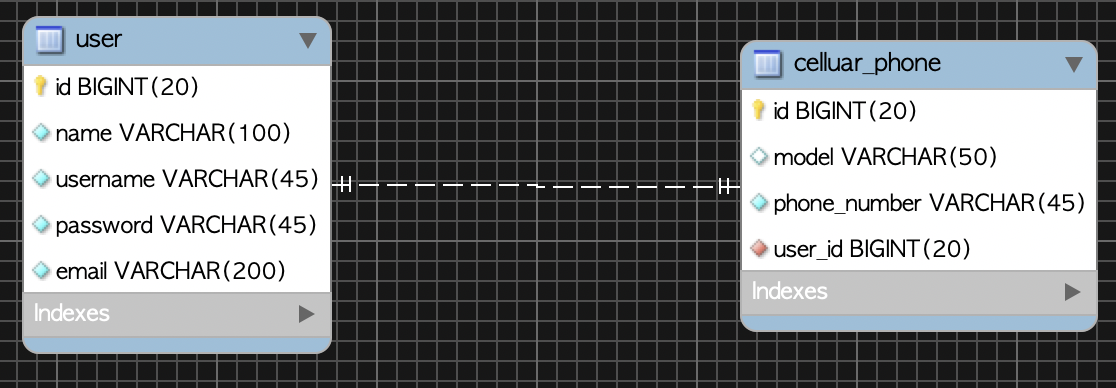
Let's look at how things change when the foreign key exists not on the owning table but on the target table.
- Owning table :
User - Target table :
CellularPhone- When it has the foreign key (user_id)
3.2.1 One-to-One Unidirectional
The foreign key is on the cellular_phone table, and a one-to-one association like the one below is not supported by JPA, so it cannot be mapped.
3.2.2 One-to-One Bidirectional
If you want to place the foreign key on the target table celluar_phone, you can configure it as below. Configure the @OneToOne annotation on the CellularPhone entity, and in the User entity use the @OneToOne annotation with the mappedBy attribute to designate CellularPhone's user, which owns the foreign key, as the owner of the association.
@Table(name = "cellular_phone")
public class CellularPhone extends DateAudit {
    @Id
    @GeneratedValue(strategy = GenerationType.IDENTITY)
    @Column(name = "phone_id")
    private Long id;
		...(omitted)...

    @OneToOne
    @JoinColumn(name = "id")
    private User user;
		...(omitted)...
}
@Table(name = "user")
public class User extends DateAudit {
    @Id
    @GeneratedValue(strategy = GenerationType.IDENTITY)
    @Column(name = "user_id", unique = true, nullable = false)
    private Long id;
		...(omitted)...

    @OneToOne(mappedBy = "user")
    private CellularPhone cellularPhone;
		...(omitted)...
}
4. References
- One-to-one
- https://kwonnam.pe.kr/wiki/java/jpa/one-to-one
- https://riptutorial.com/ko/jpa/example/22229/%EC%A7%81%EC%9B%90%EA%B3%BC-%EC%B1%85%EC%83%81-%EA%B0%84%EC%9D%98-%EC%9D%BC%EB%8C%80%EC%9D%BC-%EA%B4%80%EA%B3%84
- https://www.popit.kr/spring-boot-jpa-step-08-onetoone-%EA%B4%80%EA%B3%84-%EC%84%A4%EC%A0%95-%ED%8C%81/
- Book: Java ORM Standard JPA Programming