1. Introduction
In enterprises and elsewhere, there is now hardly any place that doesn't use Amazon services, with each company using Amazon's services a lot. The place I recently moved to also uses the S3 (Simple Storage Service) storage service, so I organized this as a way to learn the S3 API.
S3 is REST/HTTP-based storage for storing files, and it has the following characteristics, which is why many places use S3.
-
S3 service characteristics
- It supports 3-copy replication, guaranteeing data reliability (99.9999%)
- There is no limit on capacity or the number of files (e.g., 1B ~ 5TB per file)
- It provides versioning, so even files deleted by mistake can be restored
- It can be easily integrated with other Amazon services (e.g., CloudFront, Glacier)
-
Terminology
- Object: The basic unit stored in S3; you can think of it as a single file
- Key: A unique identifier used to store an object within a bucket
- e.g., test.xls, thumbs/main.jpg
- Bucket: A concept similar to a directory; you store objects in a bucket
- There is no hierarchical structure of sub-buckets or sub-folders, but you can create a logical hierarchy using key name prefixes and delimiters (e.g., develop/test.xls)
2. Development Environment and S3 Basic Setup
Most of the source code was written while looking at the examples in the Amazon SDK and Baeldung.
- OS : Mac OS
- IDE: Intellij
- Java : JDK 1.8
- Source code : github
- Software management tool : Maven
Add the Amazon SDK dependency to the pom.xml file.
<dependency>
    <groupId>com.amazonaws</groupId>
    <artifactId>aws-java-sdk</artifactId>
    <version>1.11.154</version>
</dependency>
2.1 S3 Basic Setup
To use the AWS SDK, you must complete the following three things to be able to connect to S3 and work with it in code.
-
Create an AWS account
- If you don't have an account, create an AWS account
-
AWS security credentials (you need these when coding)
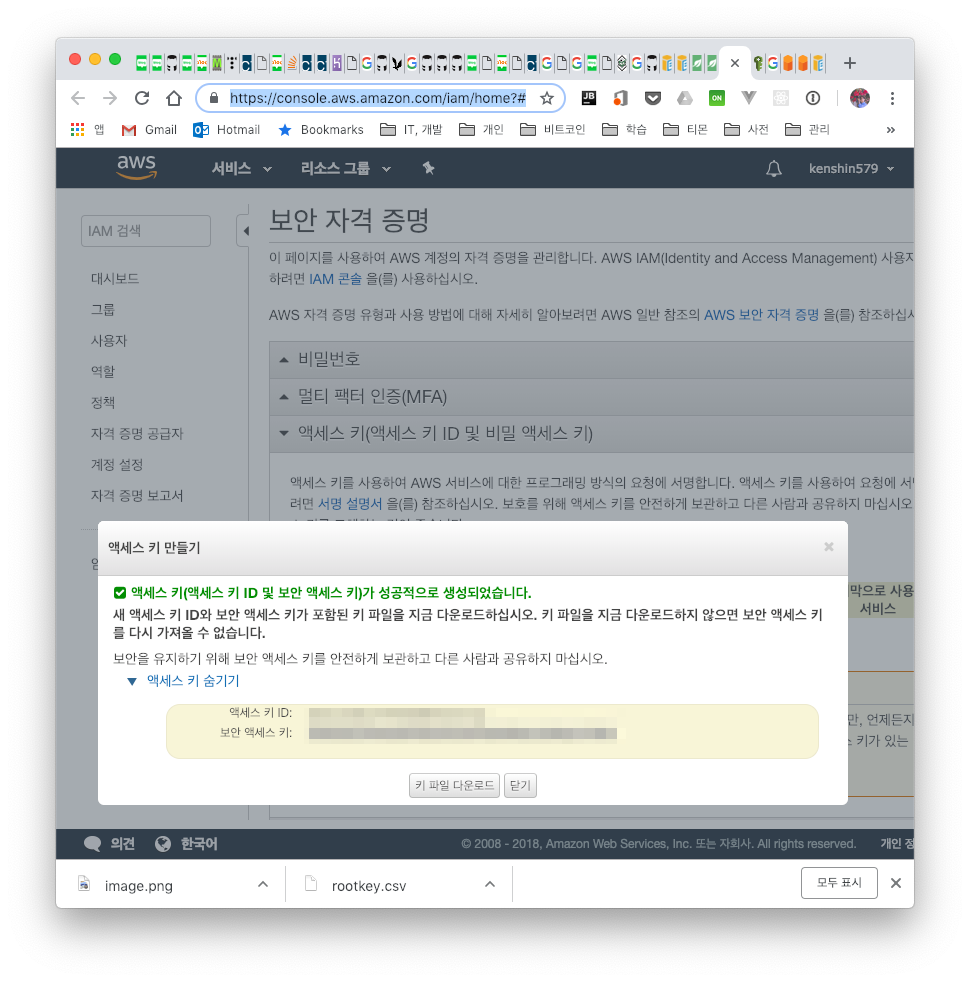
- To connect to S3, you need an access key ID and a secret access key
- Go to the security credentials site to use in your code and obtain them as shown below
-
Choose an AWS region
- Since S3 pricing differs by region, it is good to choose the nearest region
3. Handling Files in an S3 Bucket
3.1 Client Connection
You need to create a client connection to access the S3 service. You need the KEY_ID and SECRET_ACCESS_KEY created above.
3.1.1 Specifying Explicitly
There is a way to get the client connection by passing KEY_ID and SECRET_ACCESS_KEY as arguments within the source code to create a BasicAWSCredentials object.
AmazonS3ClientBuilder
      .standard()
      .withCredentials(new AWSStaticCredentialsProvider(new BasicAWSCredentials(
            KEY_ID,
            SECRET_ACCESS_KEY)
      ))
      .withRegion(Regions.AP_NORTHEAST_2)
      .build();
public class S3App {
   private static final AWSCredentials credentials;
   private static final String KEY_ID = "<key_id>";


   private static final String SECRET_ACCESS_KEY = "<secret_access_key>";
   private static AmazonS3 s3client;
   static {
      credentials = new BasicAWSCredentials(
            KEY_ID,
            SECRET_ACCESS_KEY
      );
   }

   public static void main(String[] args) throws IOException, URISyntaxException {
      s3client = createConnectionWithCredentials(credentials);
   }
}

private static AmazonS3 createConnectionWithCredentials(AWSCredentials credentials) {
   return AmazonS3ClientBuilder
         .standard()
         .withCredentials(new AWSStaticCredentialsProvider(credentials)) //#1 - Passes the value directly

         .withRegion(Regions.AP_NORTHEAST_2)
         .build();
}
If the KEY is exposed externally, anyone can use Amazon services, so if you're careless you could be hit with a bill bomb by others.
3.1.2 Specifying via Configuration
This is the second way to get a client connection. It is the approach of getting the key values stored in a configuration file.
private static AmazonS3 createConnectionWithCredentials() {
   return AmazonS3ClientBuilder
         .standard()
         .withCredentials(new DefaultAWSCredentialsProviderChain()) //#1 - Reads values stored in env variables or ~/.aws

         .withRegion(Regions.AP_NORTHEAST_2)
         .build();
}
The AWS credentials must be configured as shown below.
$ vim ~/.aws/credentials
[default]
aws_access_key_id=EXAMPLEACCESS_KEY
aws_secret_access_key=FSDFSGSDFaZiNOzYxcfQXiKq6jwiLYB6

$ vim ~/.aws/config
[default]
region=ap-northeast-2
3.2 Handling Files in an S3 Bucket
3.2.1 Creating an S3 Bucket
First, let's create a bucket. It's simple. You use the createBucket() method.
@Test
public void test_버킷_생성하기() {
   String[] bucketList = new String[] { BUCKET_NAME, BUCKET_NAME2 };
   for (String bucketName : bucketList) {
      if (s3client.doesBucketExist(bucketName)) {
         s3client.deleteBucket(bucketName);
      }
      s3client.createBucket(bucketName); //#1 - Create the bucket

      assertTrue(s3client.doesBucketExist(bucketName));
   }
}
Let's check in the unit test above whether the bucket was created.
@Test
public void test_buckets_목록_프린트하기() {
   List<Bucket> buckets = s3client.listBuckets();
   for (Bucket b : buckets) {
      System.out.println("* " + b.getName());
   }
}
3.2.2 Uploading a File
To upload a file to a bucket, use putObject(). This is an example of downloading an image from the internet and uploading it to S3.
@Test
public void test_bucket에_파일_올리기() throws IOException {
   String webImageUrl = "https://images-na.ssl-images-amazon.com/images/I/51ADJwz5bwL._SY355_.png";
   String filename = "/Users/ykoh/Desktop/test.png";
   downloadFileFromURL(webImageUrl, filename);

   String bucketKey = "image/test.png";
   s3client.putObject(BUCKET_NAME, bucketKey, new File(filename)); //#1 - This is the method that uploads the file

}

private void downloadFileFromURL(String sourceUrl, String destPath) throws IOException {
   FileUtils.copyURLToFile(new URL(sourceUrl), new File(destPath));
}
3.2.3 Downloading a File
You can download a file uploaded to a bucket to your computer. Save the file you want with the getObject() method.
@Test
public void test_bucket에서_파일_다운로드하기() throws IOException {
   String destFilename = "/Users/ykoh/Desktop/test.png";
   S3Object s3object = s3client.getObject(BUCKET_NAME, "image/test.png”); //#1 - Downloads the file

   S3ObjectInputStream inputStream = s3object.getObjectContent();
   FileUtils.copyInputStreamToFile(inputStream, new File(destFilename));  //#2 - Saves the stream to a file

}}
3.2.4 Deleting a File
When deleting a single file from a bucket, use the deleteObject() method, and to delete multiple files at once, use the deleteObjects() method.
@Test
public void test_bucket에서_파일_삭제하기() throws IOException {
   String webImageUrl = "https://images-na.ssl-images-amazon.com/images/I/51ADJwz5bwL._SY355_.png";
   downloadFileFromURL(webImageUrl, "image/test1.png");
   downloadFileFromURL(webImageUrl, "image/test2.png");
   downloadFileFromURL(webImageUrl, "image/test3.png");
   //delete single file
   s3client.putObject(BUCKET_NAME, "image/test1.png", new File("/Users/ykoh/Desktop/test.png"));
   s3client.deleteObject(BUCKET_NAME, "image/test1.png”); //#1 - Delete a single file


   //delete multiple files
   String objkeyArr[] = {  "image/test2.png", "image/test3.png" };
   DeleteObjectsRequest delObjReq = new DeleteObjectsRequest(BUCKET_NAME).withKeys(objkeyArr);
   s3client.deleteObjects(delObjReq); //#2 - Delete multiple files

}
3.2.5 Deleting a Bucket
To delete a bucket, you can only delete it after deleting all the files inside the bucket and the versioned objects as well.
@Test
public void test_bucket_삭제하기() {
   deleteAllObjectsAndBucket(s3client, BUCKET_NAME);
}

private static void deleteAllObjectsAndBucket(AmazonS3 s3client, final String bucketName) {
   try {
      ObjectListing objectListing = s3client.listObjects(bucketName); //#1 - All objects inside the bucket

      while (true) {
         Iterator<S3ObjectSummary> objIter = objectListing.getObjectSummaries().iterator();
         while (objIter.hasNext()) {
            s3client.deleteObject(bucketName, objIter.next().getKey()); //#2 - Delete one by one

         }
         if (objectListing.isTruncated()) {
            objectListing = s3client.listNextBatchOfObjects(objectListing);
         } else {
            break;
         }
      }
      VersionListing versionList = s3client.listVersions(new ListVersionsRequest().withBucketName(bucketName)); //#3 - List of versioned objects

      while (true) {
         Iterator<S3VersionSummary> versionIter = versionList.getVersionSummaries().iterator();
         while (versionIter.hasNext()) {
            S3VersionSummary vs = versionIter.next();
            s3client.deleteVersion(bucketName, vs.getKey(), vs.getVersionId()); //#4 - Delete versioned objects too

         }
         if (versionList.isTruncated()) {
            versionList = s3client.listNextBatchOfVersions(versionList);
         } else {
            break;
         }
      }
      s3client.deleteBucket(bucketName); //#5 - Delete the bucket

   } catch (AmazonServiceException e) {
      e.printStackTrace();
   } catch (SdkClientException e) {
      e.printStackTrace();
   }
}
4. References
- Amazon S3
- How to set up S3 Credentials