1. Overview
JWT (JSON Web Token) is used to securely perform authentication and information exchange in web applications. A JWT contains information by itself and generally includes user identification and authorization information. A JWT is usually used for user authentication and user information, and it's a tool that can be used for secure authentication in web applications.
The core of JWT is guaranteeing the integrity of the token through a signature. JWT signatures can use symmetric encryption (HMAC) and asymmetric encryption (RSA, EC) methods.
- Symmetric encryption (
HMAC, e.g.HS256): uses the same secret key to perform signing and verification - Asymmetric encryption (
RSA,EC, e.g. RS256, ES256): signs with a private key and verifies with a public key
When using asymmetric encryption, a JWK endpoint is sometimes provided to share the public key so that the client can verify the JWT's signature. What's used here is JWKS (JSON Web Key Set).
JWKS is a standard specification that provides public keys in JSON format, and through it, a client can verify the JWT's signature. In this post, we'll look at the concept, structure, implementation method, and practical use cases of JWKS.
2. Let's Learn About JWKS
2.1 JWK vs JWKS
-
JWK(JSON Web Key)- It's a single key (the public key of an asymmetric key pair, or a symmetric key) represented in JSON format
- A JWK includes metadata such as the key's identifier, key type, and algorithm
-
JWKS(JSON Web Key Set)- JWKS is a set of keys containing multiple JWKs
- It's usually provided at an endpoint exposed over HTTPS, and the client verifies the JWT through it.
2.2 JWKS Structure
Example. JWKS response structure
{
  "keys": [
    {
      "kty": "EC",
      "crv": "P-256",
      "x": "MKBCTNIcKUSDii11ySs3526iDZ8AiTo7Tu6KPAqv7D4",
      "y": "4Etl6SRW2YiLUrN5vfvVHuhp7x8PxltmWWlbbM4IFyM",
      "use": "enc",
      "kid": "1"
    },
    {
      "kty": "RSA",
      "n": "0vx7agoebGcQSuuPiLJXZptN9nndrQmbXEps2aiAFbWhM78LhWx4cbbfAAtVT86zwu1RK7aPFFxuhDR1L6tSoc_BJECPebWKRXjBZCiFV4n3oknjhMstn64tZ_2W-5JsGY4Hc5n9yBXArwl93lqt7_RN5w6Cf0h4QyQ5v-65YGjQR0_FDW2QvzqY368QQMicAtaSqzs8KJZgnYb9c7d0zgdAZHzu6qMQvRL5hajrn1n91CbOpbISD08qNLyrdkt-bFTWhAI4vMQFh6WeZu0fM4lFd2NcRwr3XPksINHaQ-G_xBniIqbw0Ls1jF44-csFCur-kEgU8awapJzKnqDKgw",
      "e": "AQAB",
      "alg": "RS256",
      "kid": "2011-04-29"
    }
  ]
}
JWKS represents a set of JWKs in the form of a JSON array. Each JWK object can have the following fields.
kty(key type)- This parameter is used to identify the cryptographic algorithm. It has values like
RSA,EC REQUIRED
- This parameter is used to identify the cryptographic algorithm. It has values like
use(public key use)- This parameter identifies the intended use of the public key. It has values like
sig(signature),enc(encryption) OPTIONAL
- This parameter identifies the intended use of the public key. It has values like
alg(algorithm)- This parameter is used to identify the algorithm information used with the key
OPTIONAL
kid(key id)- The JWK objects contained in a JWKS object must have different
kidvalues so they can distinguish themselves OPTIONAL
- The JWK objects contained in a JWKS object must have different
- Additional properties
- The additional property values needed differ depending on
ktyandalg - For an RSA key type,
n(public key modulus) ande(exponent) are additionally needed, and they are Base64URL-encoded values - For an EC key type,
crv(curve type),x,y(coordinates) OPTIONAL
- The additional property values needed differ depending on
2.3 JWKS Endpoint
JWKS is usually provided over HTTPS, and the client uses it to verify the JWT. Generally, the URL format is as follows.
JWKS API address format
https://<server_domain>/.well-known/jwks.json
2.3.1 How to Generate RSA Public and Private Keys
Here we use RSA for asymmetric encryption. We use the openssl command to generate the public key and private key.
> openssl genpkey -algorithm RSA -out private.key -pkeyopt rsa_keygen_bits:2048
- File name:
private.key - Key size: 2048 bits (can be increased to 4096 bits depending on security requirements)
The private key has been generated, and we extract the public key from the private key with the following command.
> openssl rsa -pubout -in private.key -out public.key
- File name:
public.key - Extracts the public key from the private key and saves it to a file
2.3.2 Generating JWKS
Generating JWKS can be easily implemented using the JWKSet (MicahParks) library. We didn't actually implement it as an API endpoint, but wrote it as a simple example in unit test form.
func (suite *jwksTestSuite) generateJWKS() (jwkset.JWKSMarshal, error) {
	pubKey, err := parsePublicKey(suite.publicKey)
	if err != nil {
		return jwkset.JWKSMarshal{}, err
	}

	jwk, err := jwkset.NewJWKFromKey(pubKey, jwkset.JWKOptions{
		Marshal: jwkset.JWKMarshalOptions{
			Private: false,
		},
		Metadata: jwkset.JWKMetadataOptions{
			USE: jwkset.UseSig,
		},
	})
	if err != nil {
		return jwkset.JWKSMarshal{}, err
	}

	if err := suite.jwkCache.KeyWrite(suite.ctx, jwk); err != nil {
		return jwkset.JWKSMarshal{}, err
	}

	jwkMarshal, err := suite.jwkCache.Marshal(suite.ctx)
	if err != nil {
		return jwkset.JWKSMarshal{}, err
	}
	return jwkMarshal, nil
}
This is code that creates a JWK from the parsed public key using the jwkset.NewJWKFromKey function, stores the generated JWKS in an in-memory JWK cache, and marshals it to return the data.
{
  "keys": [
    {
      "kty": "RSA",
      "use": "sig",
      "n": "ueE7_FhlT2gYKB8AQEjhBHpB-yS93P5TUUlVFgeI4sWZ7tnpAtrOj15WzVpOEU11hFYq1-UzEwFZI2DJQ7WOJIF9Ry63hXUTV5TZTBZoNfUAV7aaQV5G8YK6CXc6kBpghOoYcABjy0KvLUe6STU2tXPaFoASJq9MVgMZ_FpwKQrGoHHq4WQqpfu9wEnxaHu1qFYDQCAAqApoJSVeBrkVZR98hbQf0G53JbLyUZkzd6toNbCdUuOjzC7aq5ZP1GIDsNsRooUjrkE4TQjDznl0O6l8bmzOLqYcDimMPYRYtmVh_5U6uWmCLOmtp2ErQRaXovkDq-7mpb-zCSaec3HVzw",
      "e": "AQAB"
    }
  ]
}
The generated JWKS data looks like the above.
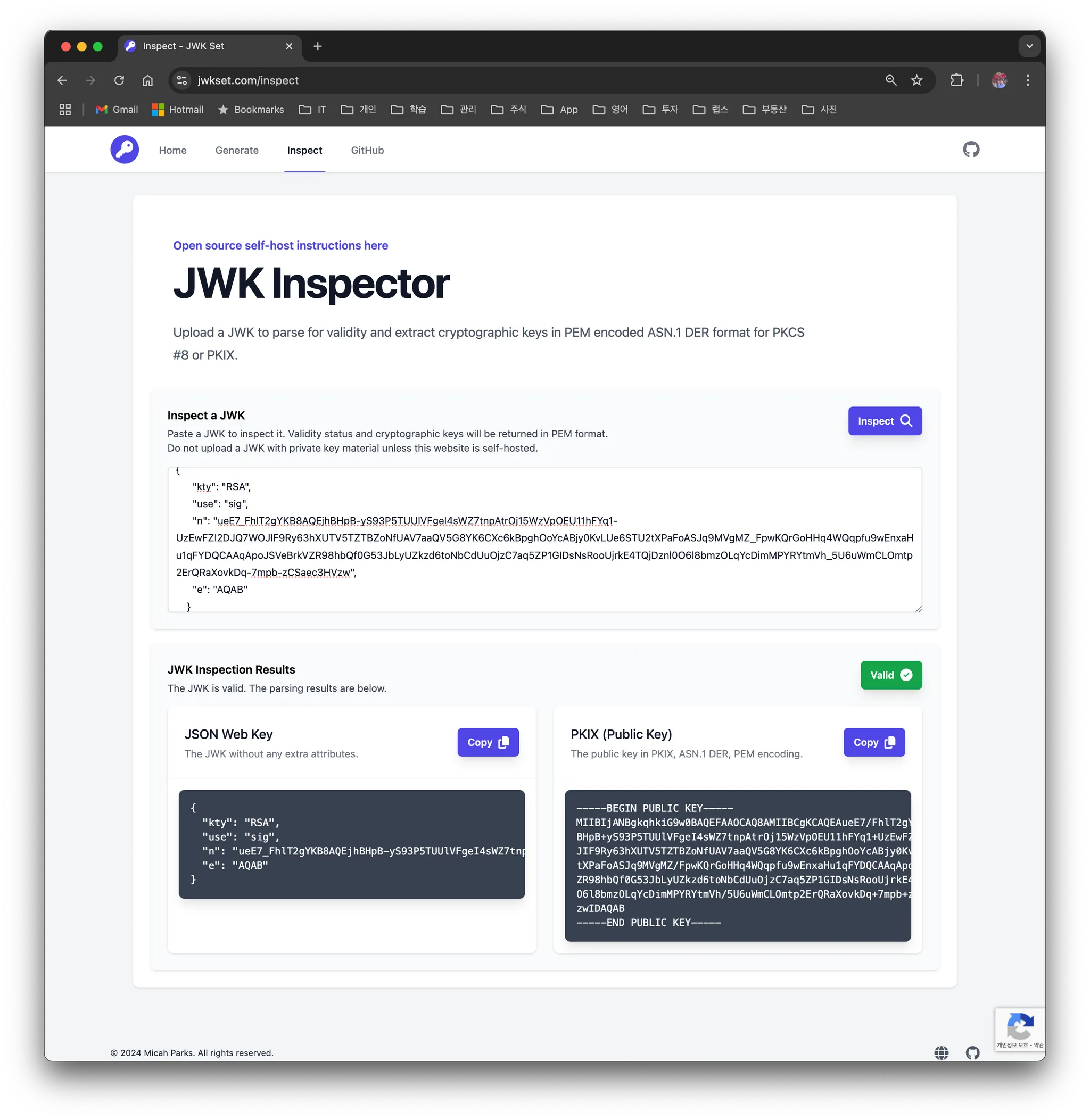
2.3.3 Introducing jwset.com
This is also a site additionally created by the developer who built the JWKSet library. It's a site where you can directly generate and test JWKS on the web.
- JWK Generator
- JWK Inspector
3. FAQ
3.1 When and how are the public key and private key each used?
- Signature
- To generate a signature, use the private key
- To verify a signature, use the public key
- e.g. a
JWTcan also be encrypted with the private key and verified with the public key
- Encryption
- When sending data, encrypt with the public key
- When decrypting data, use the private key
4. Conclusion
JWS and JWKS are essential components in an authentication system using JWT. In particular, through JWKS, you can efficiently handle key management and signature verification. I hope this post helps you understand and implement JWS and JWKS.