1. Topic Design
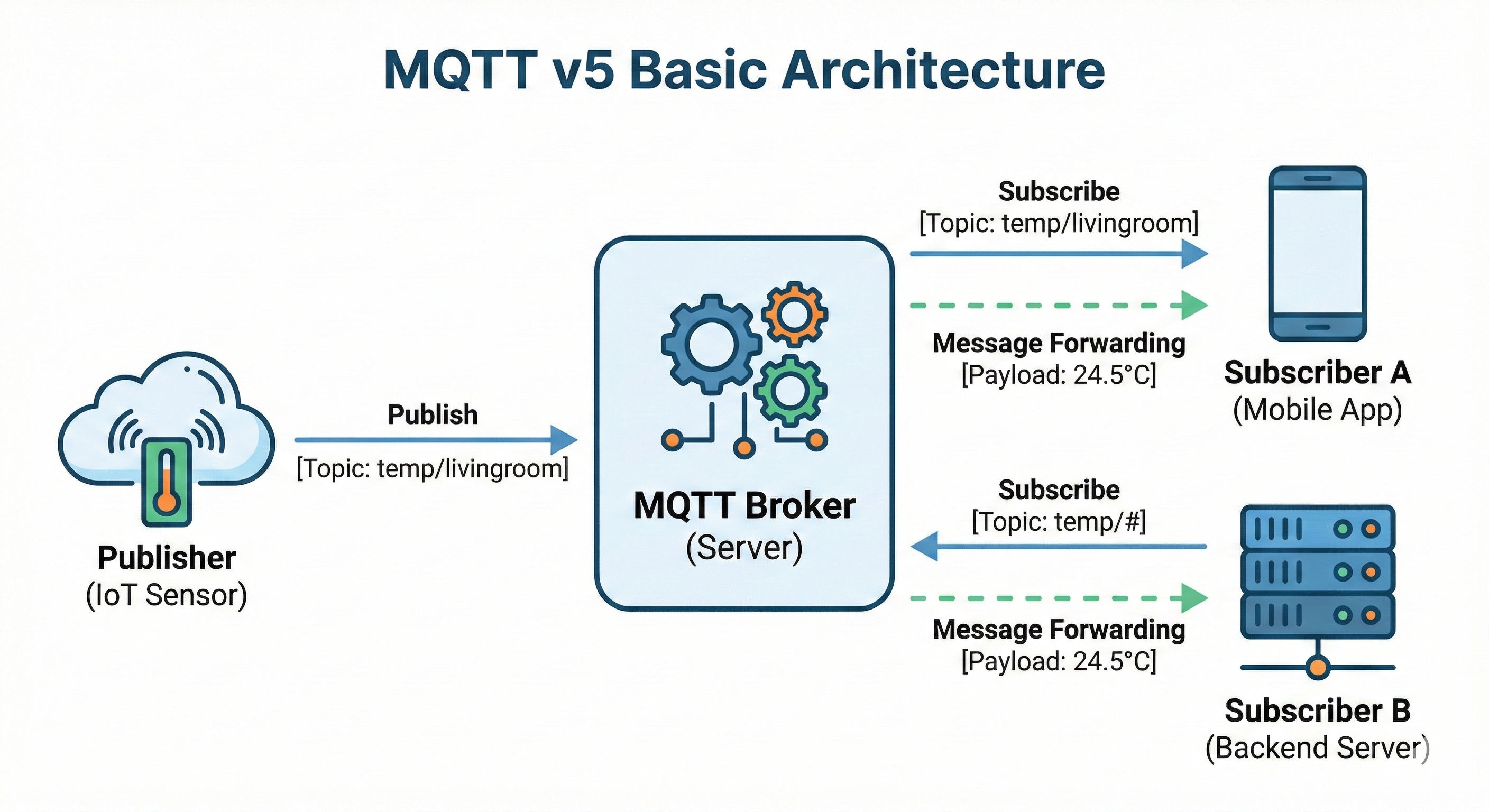
This chapter covers Topic naming conventions, Wildcard usage, and field-proven best practices. With this knowledge, you can manage messages efficiently even in systems with thousands of connected devices.
1.1 Topic Structure and Rules
1.1.1 Hierarchical Naming
Topics are divided into levels by slashes (/). This structure resembles the directory structure of a file system. Using a hierarchical structure lets you subscribe to only a specific range of messages via Wildcards, enabling very flexible message filtering. For example, you can subscribe to only the sensor data on the 3rd floor, or only the temperature data of a specific building.
# Good example
company/building/floor/room/sensor_type

# Real-world example
acme/hq/3f/meeting-room-a/temperature
acme/hq/3f/meeting-room-a/humidity
acme/hq/3f/meeting-room-b/temperature
1.1.2 Naming Rules
-
Prefer lowercase
home/temperature (O) Home/Temperature (not recommended - case-sensitive, causes confusion) -
Use hyphens or underscores instead of spaces
meeting-room-a (O) meeting_room_a (O) meeting room a (X) -
Meaningful order
# General order: broad scope → narrow scope → type
region/building/floor/room/sensor-type
1.2 Wildcard
Wildcards can be used only when subscribing. They cannot be used when publishing. With Wildcards you can subscribe to multiple Topics at once, making your code concise and easier to manage. However, excessive use of Wildcards can cause you to receive unnecessary messages and degrade performance, so use them with care.
1.2.1 + (Single-Level Wildcard)
Replaces exactly one level. It stands in for exactly one Topic level, and empty levels are not matched. It is useful when subscribing to multiple Topics that differ only at a specific position.
Subscribe: home/+/temperature

Matched:
  home/livingroom/temperature ✓
  home/bedroom/temperature ✓

Not matched:
  home/floor1/room1/temperature ✗ (2 levels)
  home/temperature ✗ (0 levels)
1.2.2 # (Multi-Level Wildcard)
Replaces all sub-levels from the given position onward.
Subscribe: home/#

Matched:
  home/livingroom ✓
  home/livingroom/temperature ✓
  home/floor1/room1/sensor1 ✓

Note:
  # can only appear at the very end
  home/#/temperature (X) - invalid usage
1.3 Topic Design Best Practices
1.3.1 Separating Command / Event / State
It is good practice to separate Topics by the nature of the message.
# Command: an instruction (something someone should do)
device/light-001/cmd/turn_on
device/light-001/cmd/set_brightness

# Event: an event (something that happened)
device/light-001/event/button_pressed
device/light-001/event/error_occurred

# State: state (the current state)
device/light-001/state/power
device/light-001/state/brightness
Why should they be separated?
Separation is beneficial because you can configure QoS and Retain strategies differently depending on the nature of the message.
- Commands must be processed →
QoS1 or higher - Events can be missed →
QoS0 is acceptable - State only the latest value matters → use Retained Messages
1.3.2 Versioning Strategy
Just like APIs, you can include a version in your Topics. Specifying a version lets you gradually migrate without affecting existing Subscribers, even when a breaking change occurs in the Payload structure or meaning.
# With version
v1/device/sensor-001/temperature
v2/device/sensor-001/temperature

# Or at the system level
mycompany/v1/device/sensor-001/temperature
1.3.3 The Problem with Excessive Wildcards
# Dangerous subscription
Subscribe: #

# This receives every message in the Broker
# - Increased load
# - Security issues
# - An unmanageable amount of data
Principle: Subscribe to only what you need.
# Bad example: too broad a subscription
home/#

# Good example: subscribe to only what you need
home/livingroom/temperature
home/livingroom/humidity
2. MQTT v5 Message Model
An MQTT message does not merely carry data. In v5, in addition to the Payload, you can transmit various metadata such as User Properties and Message Expiry Interval. This chapter explores the components that make up a message and how to use each of them. Proper message modeling has a major impact on the scalability and maintainability of a system.
2.1 Payload
The Payload is the body of the message. It holds the actual data, and the MQTT protocol does not enforce any format for the Payload. JSON, XML, Binary, or even a plain string are all possible. This flexibility is both an advantage and a disadvantage. The greater the freedom of format, the more a clear agreement between Publisher and Subscriber is required.
2.1.1 JSON Format
This is the most widely used format. Since most programming languages provide JSON parsing libraries, it is easy to implement, and because it is human-readable it is advantageous for debugging.
{
  "temperature": 25.5,
  "humidity": 60,
  "timestamp": "2024-01-15T10:30:00Z"
}
Advantages:
- Easy for humans to read
- Easy to debug
- Flexible structure
Disadvantages:
- Large size
- Parsing cost
2.1.2 Binary Format
Used in small, battery-powered IoT devices.
// Example: representing temperature 25.5 in 2 bytes
[0x00, 0xFF] // 255 = 25.5 * 10
Advantages:
- Small size
- Fast parsing
Disadvantages:
- Hard for humans to read
- Requires schema management
2.1.3 The Responsibility of Schema-less Communication
MQTT does not enforce any format for the Payload.
// From the Broker's perspective these are all handled identically
{"temp": 25}
hello world
0x00 0x01 0x02
Therefore, what developers must take responsibility for:
- Publisher and Subscriber use the same format
- Version management
- Validation
- Documentation
2.2 User Properties
A feature added in v5 that lets you add metadata to a message.
2.2.1 Passing Metadata
You can pass additional information without touching the Payload.
Payload: {"temperature": 25}

User Properties:
  content-type: application/json
  device-id: sensor-001
  firmware-version: 1.2.3
2.2.2 Correlation Information
Used to match a request with its response in the Request / Response pattern.
# Request
User Properties:
  correlation-id: req-12345

# Response
User Properties:
  correlation-id: req-12345  # matched by the same ID
2.2.3 Trace ID Propagation Pattern
Useful for log tracing in distributed systems.
# Include a Trace ID in every message
User Properties:
  trace-id: abc-xyz-123
  span-id: span-456

# You can trace the entire flow by this ID in your logs
[sensor] trace-id=abc-xyz-123 -> Published temperature
[broker] trace-id=abc-xyz-123 -> Routing to 3 subscribers
[server] trace-id=abc-xyz-123 -> Received and processed
2.3 Message Expiry Interval
Sets the time to live (TTL) of a message.
2.3.1 The TTL Concept
PUBLISH
  topic: alert/fire
  payload: "Fire detected!"
  message_expiry_interval: 60  # expires after 60 seconds
How it works:
- The Publisher sets the
TTLwhen publishing the message - The Broker starts a timer when it stores the message
- If the message is not delivered within the
TTL, it is deleted - The Subscriber can check the remaining time when it receives the message
2.3.2 Strategies for Handling Late-Arriving Messages
# Situation: a Subscriber was offline and then reconnects
# A message from 5 minutes ago is stored

# Option 1: auto-expire with TTL
message_expiry_interval: 300  # 5 minutes

# Option 2: let the Subscriber decide
if (now - message.timestamp) > threshold:
    discard(message)

# Option 3: always use only the latest value (Retained)
# Ignore previous messages and use only the last value
3. FAQ
3.1 Q: When subscribing with a Wildcard, can I know the actual matched Topic?
A: Yes, you can. The actual Topic is always included and delivered with the message.
Even when you subscribe with a Wildcard, the exact Topic information comes along when you receive a message.
# Subscribe
SUBSCRIBE topic: home/+/temperature

# When receiving messages
Message 1:
  topic: home/livingroom/temperature  ← actual Topic
  payload: 25

Message 2:
  topic: home/bedroom/temperature     ← actual Topic
  payload: 22
Go Paho example:
router.RegisterHandler("home/+/temperature", func(msg *paho.Publish) {
    // msg.Topic contains the actual matched Topic
    fmt.Printf("Topic: %s, Payload: %s\n", msg.Topic, msg.Payload)
    // Output: Topic: home/livingroom/temperature, Payload: 25
    // Output: Topic: home/bedroom/temperature, Payload: 22
})
By leveraging this, you can parse the room name and so on from the Topic and process it accordingly.
4. Conclusion
In this article, we examined Topic design and the message model, which are at the core of an MQTT system.
Topics divide levels by slashes (/), and you can subscribe flexibly using Wildcards (+, #). It is important to separate Command/Event/State by the nature of the message and to subscribe to only the range you need.
In v5, you can pass metadata via User Properties and automatically expire old messages with Message Expiry. Since MQTT does not enforce the Payload format, a clear agreement between developers is required.
Because Topic design is difficult to change after going into operation, be sure to review it thoroughly in the early stages.
Next up: In MQTT v5 Complete Guide Part 3: QoS, Session, and Reconnection Strategy, we cover how
QoSworks, session management, and the reconnection strategy that matters most in practice.